How to sell on Flipkart in 2026: a step-by-step guide for new sellers
15 min readMohit Shyani
How to sell on Flipkart in 2026: documents, GST rules, zero-commission fees, listing, shipping labels and payments, from signup to your first payout.
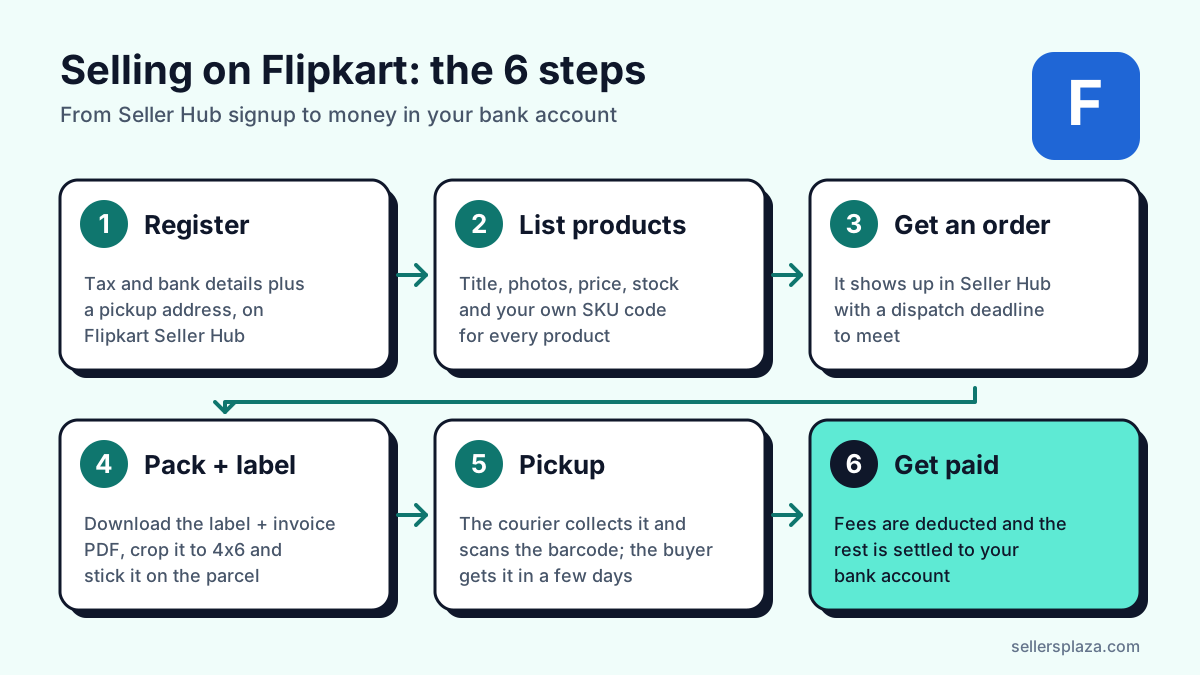
To sell on Flipkart, you register free on Flipkart Seller Hub with your mobile number, email, PAN, GSTIN (not needed for books), bank account and pickup address, list at least one product, and then pack and label each order for pickup. Flipkart takes its fees from each sale and pays the rest into your bank account. This guide walks through every step as it works in October 2026, with the current fees, the GST rules, and the parts new sellers most often get wrong.
Is selling on Flipkart worth it in 2026?
The numbers say the audience is there. Flipkart reports more than 500 million registered users, over 150 million products and more than 1.4 million sellers, including those on Shopsy (Flipkart, Sep 2026). Its active seller base nearly doubled in the 15 months to October 2026, and seller numbers grew 62% year on year (Business Standard, Oct 2026).
For readers in Gujarat, one detail stands out: Business Standard reports that Surat is now the second-largest hub for new Flipkart sellers, after New Delhi (Business Standard, Oct 2026). Big Billion Days 2026 opened with over 60% more transacting sellers than the year before (Flipkart, Oct 2026). More sellers means more competition, too - which is why the operational basics later in this guide matter as much as the signup.
Documents you need to register
Flipkart's own checklist is short: an active mobile number, an active email ID, a regular GSTIN for every category except books, PAN details (enough on their own for books), an active bank account, and at least one product to sell (Flipkart Seller Hub). Its Terms of Use add the pickup address, registered address, a cancelled cheque and your signature - Flipkart places a digital image of that signature on the invoices it generates for you (Terms of Use, Jun 2025).
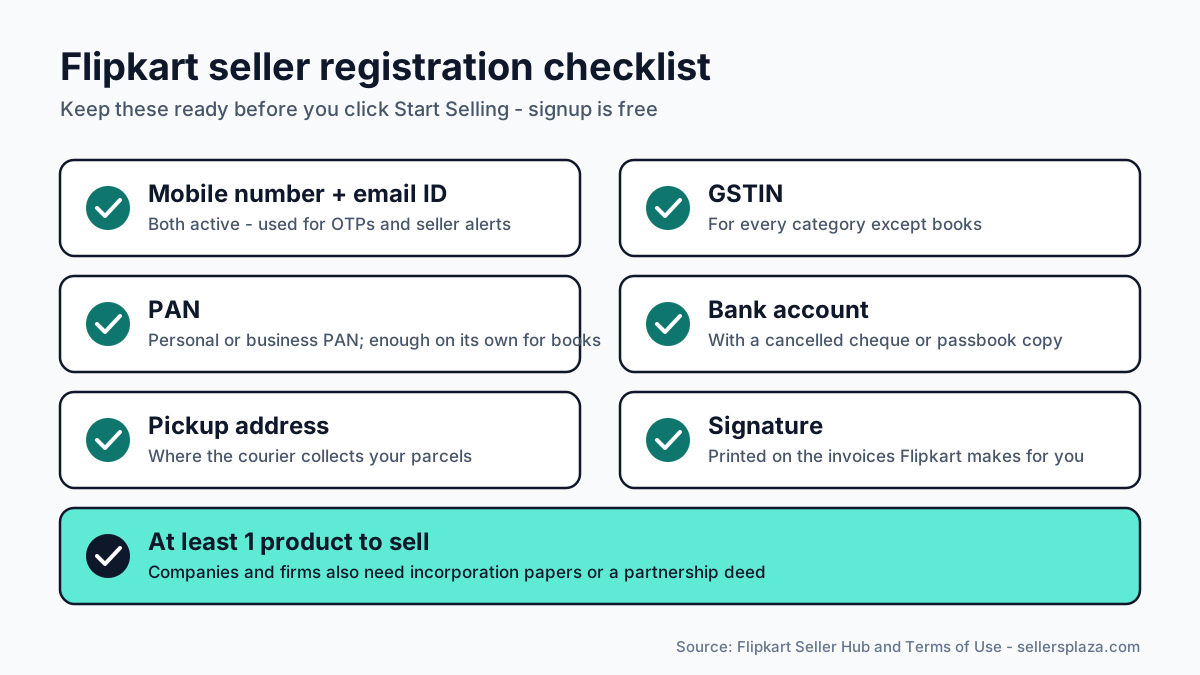
Flipkart's seller guide also asks for business address proof and identity proof, and companies or partnership firms need their incorporation certificate or partnership deed (Flipkart seller guide). Expect more checks than a GST number and PAN: Flipkart says it now runs fraud-linkage checks on device IDs and pickup addresses, and GST two-factor authentication is mandatory (Flipkart Stories).
Can you sell on Flipkart without GST?
Only for books, as far as Flipkart officially says. Books are the one category its signup page opens to sellers with PAN and no GSTIN (Flipkart Seller Hub; Sell books online). For everything else, Flipkart sends sellers without a GSTIN to gst.gov.in to apply.
The law did change in your favour in 2023. Since 1 October 2023, small suppliers selling through an e-commerce operator can skip GST registration if their turnover is under the state threshold, they sell in only one state, and they make no inter-state supplies - using a PAN-based enrolment number instead (CBIC Notification 34/2023). Composition-scheme sellers can also sell through marketplaces, but only within their own state (Notification 36/2023). Flipkart's public pages do not say whether it accepts the enrolment number in place of a GSTIN, so confirm with seller support before you plan around it.
Either way, Flipkart deducts GST TCS (tax collected at source) from your payouts: 0.5% of net taxable sales since 10 July 2024, down from 1% (PIB, Dec 2024). Keep the TCS statements for your accountant: it is tax already paid on your behalf.
How to register on Flipkart Seller Hub, step by step
- Go to seller.flipkart.com and click Start Selling. Registration is free (Terms of Use).
- Enter your mobile number and email ID and verify them with the OTPs.
- Enter your PAN and GSTIN (or PAN only, for books), then complete GST two-factor verification.
- Add your pickup address - the place the courier will collect parcels from.
- Add your bank account with a cancelled cheque, upload your signature, and set your display (store) name.
- Submit for KYC. Flipkart says verification "usually takes a few working days" (seller guide); the form itself takes about 10-20 minutes (Business Standard).
Flipkart seller fees in 2026
Flipkart lists four charges on an order: commission by category, a fixed fee, a collection fee, and a shipping fee where applicable (Flipkart seller guide). The full rate card depends on category, shipping method and selling price, and it only appears in your dashboard after signup (Fees and commission).
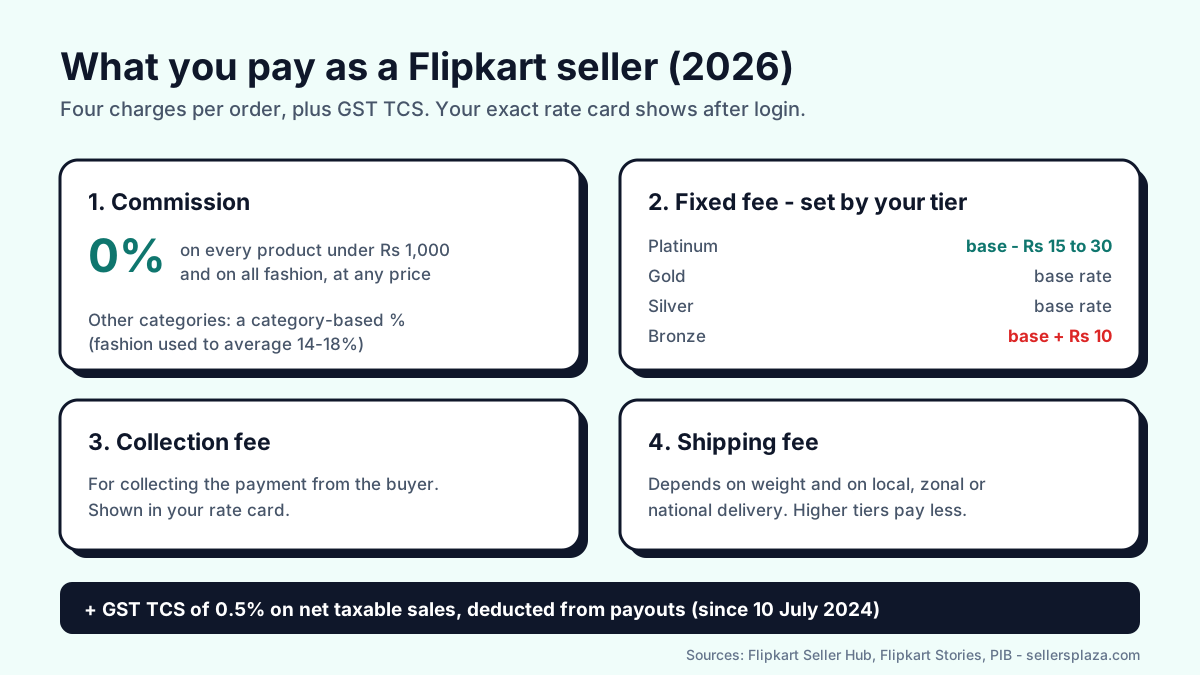
The big change is commission. Since 14 November 2025, every product priced under Rs 1,000 pays 0% commission, in any category (Business Standard, Nov 2025). On 8 July 2026 Flipkart removed the price cap for fashion, so all apparel, footwear, bags, watches, sunglasses and jewellery now pay 0% at any price - affecting about 90,000 fashion sellers (Flipkart, Jul 2026). Other categories still pay a category-based commission.
Zero commission is not zero cost. Depending on the services you use, you still pay for shipping and any advertising (Business Standard, Jul 2026). The fixed fee also depends on your seller tier (Fees and commission):
| Seller tier | Fixed fee |
|---|---|
| Platinum | Base rate minus Rs 15 to Rs 30 |
| Gold | Base rate |
| Silver | Base rate |
| Bronze | Base rate plus Rs 10 |
Your tier depends on sales, fulfilment (breaches and cancellations), the share of local and zonal shipments, and customer feedback. Higher tiers also get cheaper shipping rate cards, account management and faster payments (Terms of Use). In other words, dispatching on time is not only about avoiding penalties - it directly lowers what every future order costs you.
How to list your products
There are two ways to list. If the product already exists on Flipkart, you "latch" onto its page and add your price and stock. If it does not, you create a new listing with the description, dimensions, features, images and usage instructions (Flipkart Seller Hub). Flipkart has over 3,000 categories open to sellers and says precise information and clear images can raise a product's visibility by up to 15% (same source).
- Write titles a buyer would search for: brand, product, key feature, size or colour.
- Shoot on a plain background in good light and show the product from several angles. If Seller Hub rejects a photo for its file size, shrink it to the size in KB it asks for without uploading it anywhere.
- Give every variant its own clear SKU code, like KURTI-BLUE-M. You will see that code on every shipping label, and a readable SKU is what stops the wrong size going in the box.
- Keep brand papers ready. Flipkart can suspend sellers who cannot produce a brand authorisation letter, trademark proof, BIS licence or drugs-and-cosmetics documents when asked (Terms of Use).
If you sell your own brand, look at Brand Assure. It lets trademark owners see who sells their products and report unauthorised listings; Flipkart says over 11,000 brands use it and that its systems block more than 300,000 potentially prohibited listings a month (Flipkart Stories).
Shipping: Fulfilment by Flipkart or ship it yourself
You choose between two models (Flipkart Seller Hub). In both, Flipkart manages returns and customer service.
| Seller-fulfilled (NFBF) | Fulfilment by Flipkart (FBF) | |
|---|---|---|
| Who stores and packs | You | Flipkart, in its warehouse |
| Pickup | A Flipkart agent collects from your address | You send stock to a fulfilment centre |
| Reach | 19,000+ PIN codes | Flipkart network |
| FAssured badge | Earned through your reliability score | Included by default |
| Who can use it | Every seller | By invitation, based on performance (FBF guide) |
Most new sellers start seller-fulfilled. The FAssured badge, which promises delivery in 2-4 days, is worth working towards: Flipkart says it has helped sellers reach up to 3x sales growth (Flipkart Grow).
Packing an order and printing the shipping label
When you pack an order in Seller Hub, Flipkart generates the tax invoice and the shipping label together and marks the item packed (Flipkart API docs). When you download them, multiple orders come back as one merged PDF - the label plus the customer invoice on each page, up to 100 shipments at a time (Flipkart API docs). Then you mark the orders Ready to Dispatch and hand them over with the manifest (Flipkart API docs).
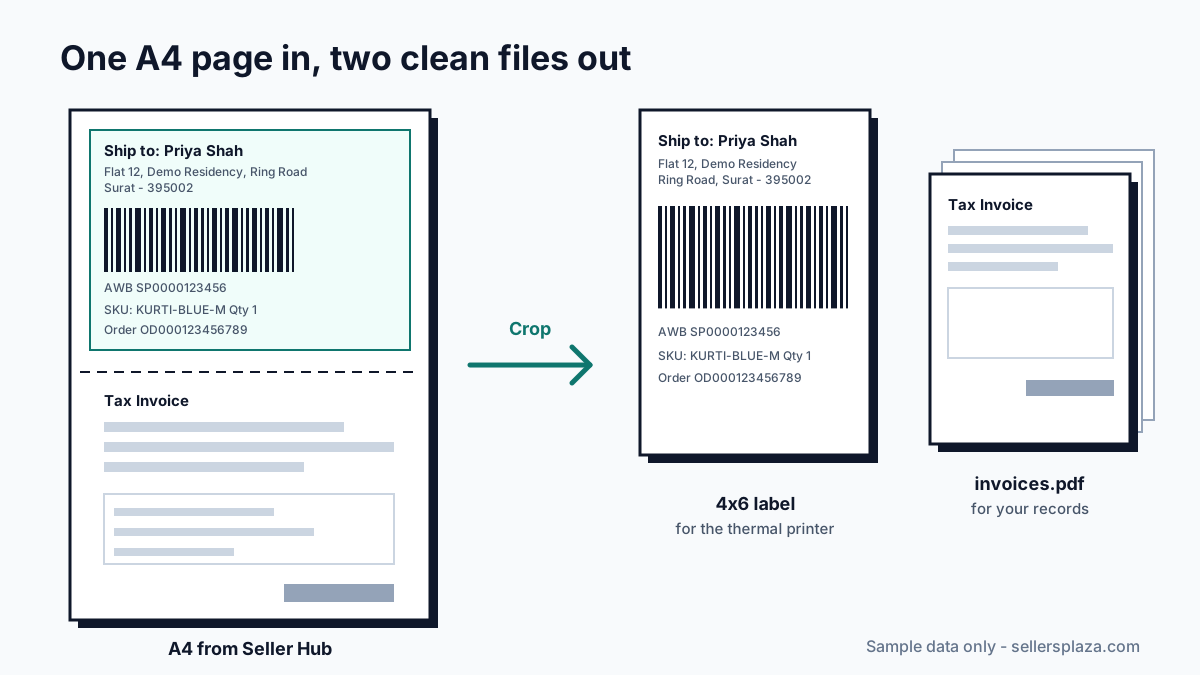
That A4 layout is where many new sellers waste money. Print the whole page on a 4x6 thermal roll and the printer shrinks it to fit, barcode and all, so the courier struggles to scan it. Print it on A4 paper and you use a full sheet per order. The fix is to crop: put the label on a 4x6 thermal label and keep the invoices as their own file. Flipkart's Terms of Use say the seller must sign, print and affix the invoice on the consignment, so you do need those invoices - just not glued to the label.
You can do this free in your browser with Flipkart seller shipping label crop with invoice. It cuts each label to 4x6, gives you the invoices as a separate file, sorts the labels by SKU, splits them by courier, and flags orders worth a second look - a too-short address, a repeat buyer, or a pincode from your own high-return list. If you only want the crop, the plain Flipkart label cropper does just that. Downloaded several batches in a day? Merge them into one PDF and print once.
When does Flipkart pay sellers?
Flipkart's own pages give different answers, because the timing depends on your tier. Its fees page says payment starts when the product is picked up and can arrive "in as fast as 3 days" (Fees and commission). Its main seller page says as fast as 7 days from dispatch (Flipkart Seller Hub). Its step-by-step guide puts it at 7-10 business days after delivery (seller guide). Plan your cash flow on the slower figure until you have seen a few payout cycles yourself.
Payouts are net: Flipkart deducts its fees, TCS and anything else you owe before settling (Terms of Use). If a payment looks wrong, raise it quickly - monetary claims not covered by a specific policy must be raised within 180 days.
Cancellations, late dispatch and returns
From 23 August 2026 Flipkart reportedly charges per-order penalties: Rs 30 for missing the dispatch-by date, Rs 60 for cancelling an order after receiving it, and Rs 90 for missing the date and then cancelling, with sellers in their first three months exempt (Business Standard; Inc42). Both reports cite people familiar with the matter rather than an official release, so check the current policy in your dashboard.
- Only list stock you actually have, and keep stock counts updated - a cancellation for "out of stock" is the most avoidable penalty there is.
- On returns, Flipkart can recover forward and return shipping costs from you, and items packed against its packaging guidelines are not covered by the Seller Protection Fund (Terms of Use). Good packing is cheaper than a lost claim.
- Cash-on-delivery orders come back far more often than prepaid ones - 24% against 10% across Unicommerce's platform in 2024 (Business Standard). Before you ship, look again at orders with a very short address or a buyer who has ordered several times in one batch - a quick call costs less than a return.
Growing: ads, Shopsy and sale events
Flipkart Ads has two campaign types: Cost Per Click, for visibility on new or slow-moving listings, and Smart ROI, which aims for a minimum return on ad spend (Flipkart Ads). The Seller Hub app covers listings, orders, payments and ads from your phone, and the dashboard adds price recommendations and inventory health (Flipkart Grow).
Your Flipkart account also opens Shopsy, Flipkart's value marketplace. Flipkart and Shopsy sellers use the same dashboard, Shopsy accepts product photos taken on a phone, and Flipkart says no trademark registration is needed (Shopsy for sellers). Flipkart calls Shopsy "a truly zero commission platform" with 450 million+ app downloads and delivery to 20,000+ PIN codes (Flipkart, May 2026). Shopsy labels can be cropped with the Shopsy label cropper.
Sale events are where volume comes from. On the early-access day of Big Billion Days 2026, Flipkart says 51% of transacting sellers doubled their sales compared with regular days (Flipkart, Oct 2026). Before a sale, stock up, check your packing material, and make sure your label workflow can handle three or four times the usual orders.
Six mistakes new Flipkart sellers make
- Listing more stock than they have, then cancelling - which costs a penalty and drags the seller tier down.
- Missing the dispatch-by date because labels were printed at the last minute.
- Printing the full A4 page on a thermal printer, so the barcode comes out too small to scan.
- Packing from the invoice instead of the label and sending the wrong size or colour - a return they caused themselves. SKU-sorted labels fix this.
- Shipping risky cash-on-delivery orders without a second look at the address.
- Ignoring tier: on-time dispatch and few cancellations lower the fixed fee and shipping on every future order.
Frequently asked questions
Is it free to register as a Flipkart seller?
Yes. Registration costs nothing (Terms of Use). You pay fees only when you sell.
How long does Flipkart seller registration take?
The form takes about 10-20 minutes. KYC verification usually takes a few working days after that.
How much commission does Flipkart charge?
0% on any product priced under Rs 1,000 and on all fashion at any price. Other categories pay a category-based commission shown in your rate card. A fixed fee, collection fee and shipping still apply.
Can I sell on Flipkart without a GST number?
Officially, only books can be sold with PAN alone. GST rules since October 2023 allow small intra-state sellers on marketplaces to use a PAN-based enrolment number, but confirm with Flipkart seller support whether your account can use it.
What size is a Flipkart shipping label?
Flipkart does not publish an official print size. The download is an A4 page with the label on top and the invoice below; most sellers crop the label to 4x6 inches for a thermal printer, or print four labels per A4 sheet.
Can I sell on Shopsy with my Flipkart account?
Yes. Shopsy uses the same seller dashboard as Flipkart, so you manage both from one account.
Sources
Every figure above links to its source. The main ones, all checked on 12 October 2026:
- Flipkart Seller Hub: Sell online, Fees and commission, Terms of Use, How to sell on Flipkart, Shopsy, Flipkart Ads
- Flipkart Seller API docs: Pack API, Labels, Label-only PDF
- Flipkart Stories: Big Billion Days 2026, Zero commission for fashion, Shopsy
- Government: CBIC Notification 34/2023, Notification 36/2023, PIB on TCS
- News: Business Standard on seller growth, on zero commission, on penalties; Inc42 on penalties
Fees and penalties change, usually before festive sales. Always confirm the current rate card in your own Seller Hub dashboard.
Tools in this guide
Flipkart seller shipping label crop with invoice
Crop to 4x6, invoices separate, sort by SKU, flag risky orders.
Open toolFlipkart label crop
Keep the Ekart barcode sharp, drop the invoice.
Open toolShopsy label crop
Label on top, packing slip gone.
Open toolMerge PDF to PDF online
Combine PDFs into one file, reorder, pick pages. No upload.
Open toolResize image in KB
Shrink photos to 20, 50, 100 KB or any size. No upload.
Open tool